


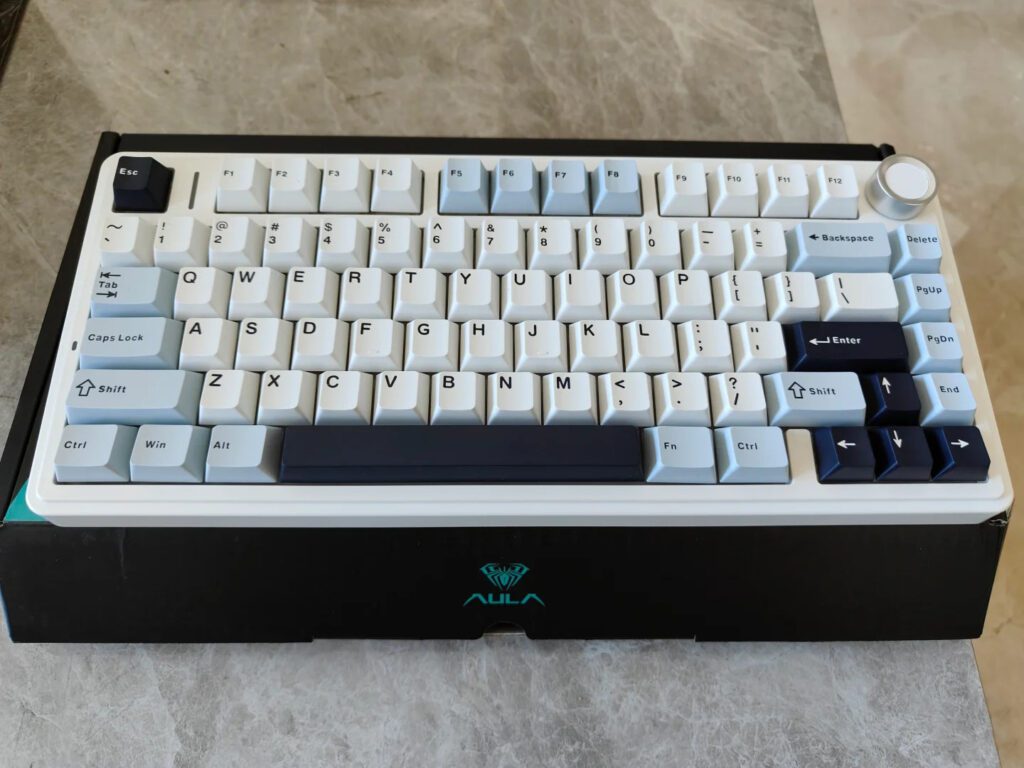
Comparing Aula F75 and Wooting 80HE Keyboards
Explore key differences between Aula F75 and Wooting 80HE keyboards.
| Features | Aula F75 | Wootingf 80HE |
|---|---|---|
| Layout Size | Compact 75% layout with 80 keys | Standard 80% layout with extra keys |
| Connectivity Options | Tri-mode: Bluetooth, 2.4GHz, USB-C | Wired USB-C only |
| Switch Type | Pre-installed LEOBOG linear switches | Adjustable Lekker V2 magnetic switches |
| Analog Input | No analog input, traditional switches | Full analog input with 0.1mm accuracy |
| Polling Rate & Latency | 1000Hz polling, ~3.8ms latency wired | 8000Hz polling, ultra-low 0.2ms latency |
| Sound Dampening | Five-layer sound-dampening structure | Silicone gasket and PC plate soften sound |
| Customization | Hot-swap switches, RGB, macros, device switch | Adjustable actuation, RGB, macros, rapid trigger |
| Build Materials | ABS plastic case with steel backplate | ABS or zinc alloy case options |
| Battery Life | 4000mAh battery, up to 1 week usage | No battery, wired only |
| Price Range | $65.98 – $70.98, affordable option | $180 – $250, premium price |
If you want top-tier gaming performance, you should choose the Wooting 80HE. You get ultra-low latency and analog input, which help you react faster in games. For everyday use, the F75 keyboard offers strong value and versatility. You enjoy tri-mode wireless connectivity and easy customization. If you type often or need a quiet workspace, both keyboards provide a smooth experience, but the F75 keyboard stands out for quiet operation and portability. Use this comparison to match your needs with each keyboard’s strengths.
Key Takeaways
- The Wooting 80HE excels in gaming with ultra-low latency and analog input for precise control and faster reactions.
- The Aula F75 offers strong value with quiet operation, tri-mode wireless connectivity, and a compact design for easy portability.
- Both keyboards have durable builds and hot-swappable switches, but the Wooting 80HE has a longer switch lifespan and premium materials.
- Choose the F75 for multi-device use and quiet typing; pick the Wooting 80HE for advanced customization and competitive gaming.
- Price differs significantly: the F75 is affordable and feature-rich, while the Wooting 80HE is a premium option with cutting-edge technology.
Design
Build
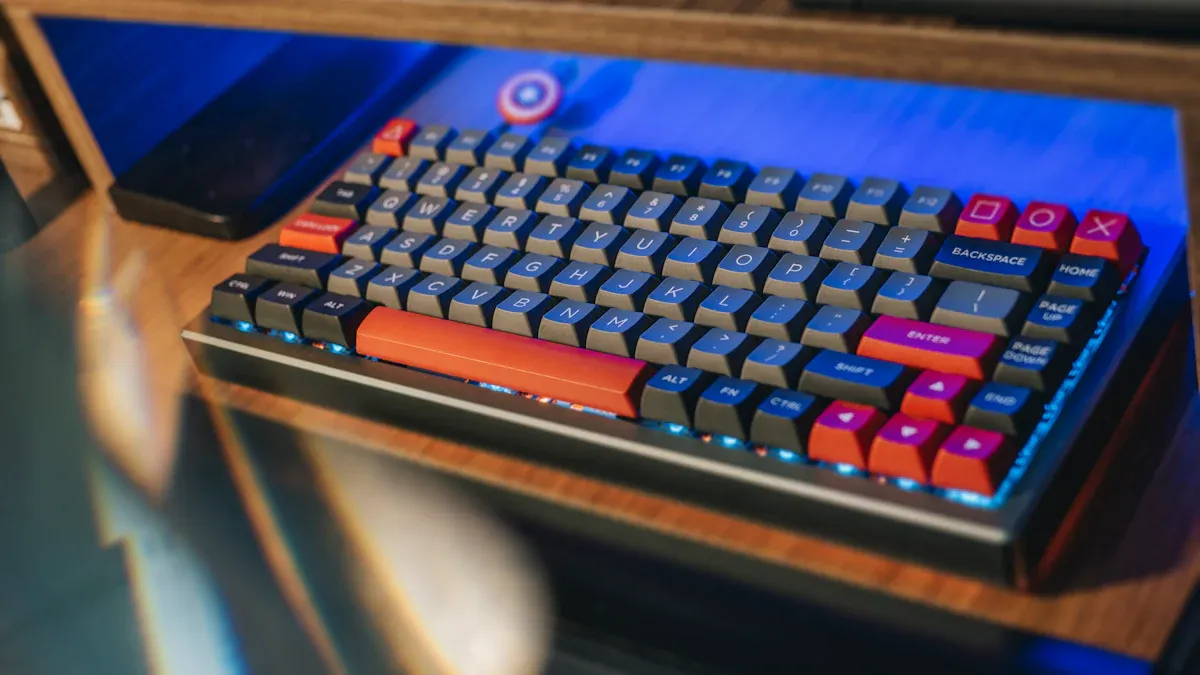
When you look at the build quality, both keyboards use strong materials, but they feel different in your hands. The F75 keyboard uses a high-quality ABS plastic case with a steel back plate. This combination gives you a sturdy and stable feel. The Wooting 80HE offers options for ABS plastic or zinc alloy cases, so you can choose a lighter or heavier build. Both keyboards use gasket mounting, which helps reduce vibrations and makes typing softer.
Here is a quick comparison of their construction:
| Aspect | F75 Keyboard | Wooting 80HE |
|---|---|---|
| Casing Material | ABS plastic | ABS plastic or zinc alloy |
| Back Plate | Steel | Varies (depends on model) |
| Mounting Style | Gasket mount with flex-cut PC plate | Gasket mount with silicone gasket |
| Sound Dampening | Five-layer sound-dampening structure | Silicone gasket, PC plate for softer sound |
| Keycaps | Cherry profile ABS, textured surface | Varies, often PBT or ABS |
You get a solid and premium feel from both, but the F75 keyboard stands out for its sound-dampening layers, which make it quieter.
Layout
You will notice a difference in layout right away. The F75 keyboard uses a 75% layout with 80 keys. This design saves desk space and makes it easy to carry. The Wooting 80HE uses an 80% layout, which adds a few extra keys, giving you more shortcuts and functions. If you want a compact keyboard for travel or a small desk, the F75 keyboard works well. If you need more keys for gaming or productivity, the Wooting 80HE gives you that flexibility.
Tip: Choose the layout that matches your daily tasks. Compact layouts help with portability, while larger layouts offer more features.
Durability
Durability matters when you invest in a keyboard. The F75 keyboard uses a steel plate and rubber feet for stability. Its switches last up to 5 million presses, and the case resists daily wear. The Wooting 80HE uses Lekker V2 switches rated for 100 million clicks, and its zinc alloy case option adds extra toughness. Both keyboards use high-quality stabilizers and sound-dampening features, so you get a long-lasting product. If you want a keyboard that handles heavy use, both options deliver strong performance over time.
Typing
Key Feel
When you compare the key feel of these two keyboards, you notice clear differences in how each one responds to your touch. The Wooting 80HE uses adjustable magnetic switches. You can set the actuation distance for each key, which means you control how far you need to press before the key registers. This feature gives you a softer and quieter typing experience. The F75 keyboard comes with pre-installed linear switches that offer smooth keystrokes and a consistent feel. Both keyboards use a gasket-mounted design, which adds flexibility and reduces harshness when you type.
Here is a quick look at their tactile response and feedback:
| Keyboard | Switch Type | Mounting/Design Features | Tactile Response & Feedback Characteristics |
|---|---|---|---|
| Wooting 80HE | Adjustable magnetic switches | Gasket-mounted, flexible PC plate | Customizable actuation distance; softer, quieter |
| F75 keyboard | Linear mechanical switches | Gasket mount, sound-dampening | Smooth, consistent keystrokes; quiet operation |
Tip: If you want to fine-tune your typing experience, the Wooting 80HE gives you more control. If you prefer a straightforward, smooth feel, the F75 keyboard delivers that.
Ergonomics
Comfort plays a big role when you spend hours typing. The Wooting 80HE features a low front height of 28.4mm with OEM keycaps at a 2.8° angle. You can adjust the angle using silicone feet, choosing between 2.8°, 6°, or 10°. Most users find the 6° angle comfortable for different hand sizes. Lower height and adjustable angles help reduce tendon strain and muscle fatigue, making long sessions easier on your hands. The F75 keyboard also offers a compact design, which helps with portability and reduces wrist movement.
| Ergonomic Factor | Details / Metrics |
|---|---|
| Front side height | 28.4mm with OEM keycaps at 2.8° angle |
| Angle options | 2.8°, 6°, 10° (exchangeable silicone feet) |
| Comfort impact | Lower height and angle reduce strain, support longer typing sessions |
Note: Your comfort may improve as your muscle memory adapts to a new keyboard layout or angle.
Noise
Noise level can affect your workspace, especially if you work in a shared environment. The Wooting 80HE uses a gasket mount and a flexible PC plate, which help dampen sound and create a softer typing noise. The F75 keyboard includes a five-layer sound-dampening structure, foam padding, and sound-absorbing seals. This design keeps keypress sounds quiet and reduces hollow noise. Both keyboards aim for a quieter experience, but the F75 keyboard stands out if you want minimal noise during typing.
Gaming

Latency
When you play fast-paced games, latency can make or break your performance. The Wooting 80HE stands out with its ultra-low latency, thanks to an 8000Hz polling rate. This means the keyboard updates your inputs 8000 times per second, resulting in a response time as low as 0.2ms. You feel every action almost instantly, which is crucial for competitive gaming.
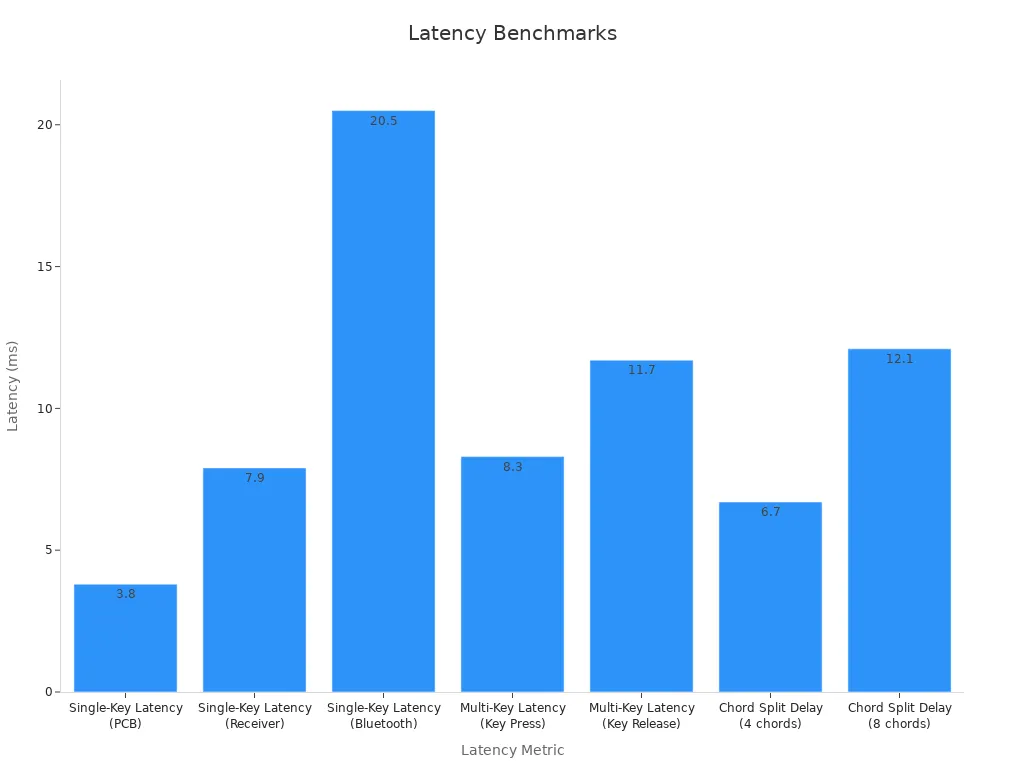
The F75 keyboard also delivers impressive responsiveness, especially when you use the wired or 2.4 GHz wireless mode. Its latency benchmarks show that you get a single-key latency of 3.8ms at the PCB level and 7.9ms through the 2.4 GHz receiver. Bluetooth mode introduces higher latency, around 20.5ms, so you should avoid it for gaming. Both keyboards support N-Key Rollover, so you never miss a keypress, even during intense multi-key actions.
Here is a quick comparison of latency benchmarks:
| Metric | Value (ms) | Notes |
|---|---|---|
| Single-Key Latency (PCB) | 3.8 | Estimated latency at the keyboard PCB level |
| Single-Key Latency (Receiver) | 7.9 | Latency measured via 2.4 GHz wireless receiver |
| Single-Key Latency (Bluetooth) | 20.5 | Higher latency due to Bluetooth’s lower polling rate |
| Multi-Key Latency (Key Press) | 8.3 | Time to register additional key presses during simultaneous key activity |
| Multi-Key Latency (Key Release) | 11.7 | Time to register key releases during multi-key input |
| Chord Split Delay (4 chords) | 6.7 | Delay when pressing 4 simultaneous keys, relevant for rhythm or multi-input games |
| Chord Split Delay (8 chords) | 12.1 | Delay when pressing 8 simultaneous keys |
| USB Polling Rate | 1000 Hz | Maximum polling rate for wired or 2.4 GHz wireless connection |
| Effective Update Rate | 1000 Hz | Actual update rate matching polling rate |
| N-Key Rollover | Yes | Supports multiple simultaneous key presses without input loss |
| Multiple Keys per USB Report | Yes | Enables efficient transmission of multiple simultaneous inputs |
Tip: For the lowest input lag, always use a wired connection or high-speed wireless mode. Bluetooth is best for casual use, not for gaming.
Analog Input
Analog input changes how you interact with games. The Wooting 80HE gives you full analog control on every key. You can press a key lightly to walk or push it down fully to run, just like using a joystick. This feature gives you more precise movement in racing, action, or simulation games. You can also set the actuation point for each key, from 0.1mm to 4.0mm, so you decide how sensitive your keyboard feels.
The F75 keyboard uses traditional mechanical switches. You get a consistent on/off response, which works well for most games. However, you do not get analog control or adjustable actuation. If you want to fine-tune your movement or need variable input for advanced gameplay, the Wooting 80HE offers a clear advantage.
Note: Analog input is especially useful in games that support gradual movement or pressure-sensitive actions. If you play shooters or rhythm games, you may not need this feature, but for racing or creative applications, it can make a big difference.
Gaming Features
Both keyboards come packed with features that help you perform better in games, but they focus on different strengths.
Wooting 80HE:
- Ultra-low latency (0.2ms) with 8000Hz polling rate for instant response.
- True zero dead zone, so every key registers immediately.
- Rapid Trigger technology lets you tap keys repeatedly without lifting them all the way, perfect for FPS and fighting games.
- Rappy Snappy and other advanced gaming functions improve timing and accuracy.
- Per-key RGB lighting and a unique LED bar for status feedback.
- Hot-swappable Lekker V2 switches for easy customization.
- Powerful software for remapping, macros, and profile management.
- On-board memory stores your settings, so you can use your profiles anywhere.
- Full anti-ghosting (NKRO) ensures every keypress counts.
AULA F75:
- Tri-mode connectivity (wired, 2.4 GHz wireless, Bluetooth) for flexible setups.
- Hot-swappable switches for easy upgrades.
- Five-layer sound dampening for quiet gaming sessions.
- Customizable RGB lighting with multiple effects.
- Dedicated aluminum knob for quick media and lighting control.
- Multi-device pairing for seamless switching between systems.
- Full N-Key Rollover for accurate multi-key input.
If you want the most advanced gaming technology, especially for competitive play, the Wooting 80HE leads with its analog input and ultra-fast response. If you value versatility, quiet operation, and easy customization, the F75 keyboard gives you a strong all-around experience.
Features
F75 Keyboard Features
You get a feature-rich experience with the F75 keyboard. Its compact 75% layout saves desk space while still offering all essential keys. The keyboard uses a five-layer internal structure, including Poron foam and a silicone base, to reduce noise and vibration. You will notice the smooth and quiet typing, thanks to factory-lubricated LEOBOG Graywood V3 switches with a 40g operating force and a 60 million keystroke lifespan. The Cherry-profile double-shot PBT keycaps feel durable and display large, clear characters.
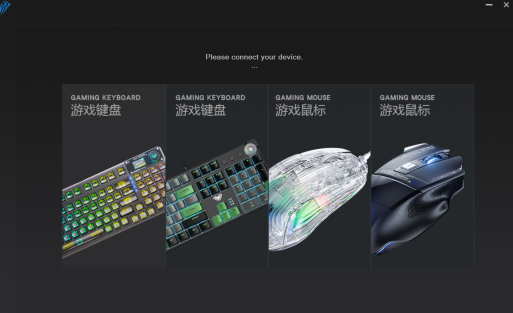
For connectivity, you can switch between Bluetooth 5.0, 2.4GHz wireless, and USB-C wired modes. The 4000mAh battery supports up to a week of use with RGB off. The keyboard also features a magnetic storage slot for the wireless receiver and anti-slip pads for stability. You can control volume easily with the aluminum roller. The AULA Driver software lets you remap keys, customize RGB lighting, and create macros.
| Feature | Details |
|---|---|
| Layout | 75% compact, 80 keys |
| Switches | LEOBOG Graywood V3, 40g force, 60M lifespan |
| Keycaps | Cherry-profile, double-shot PBT |
| Connectivity | Tri-mode: Bluetooth 5.0, 2.4GHz, USB-C |
| Battery | 4000mAh, up to 1 week (RGB off) |
| Sound Dampening | Five-layer structure, Poron foam, silicone base |
| Software | AULA Driver: remapping, RGB, macros |
Wooting 80HE Features
The Wooting 80HE stands out with its analog input technology. You can adjust the actuation point of each key from 0.1mm to 4.0mm, which gives you precise control for gaming or typing. The keyboard uses Lekker V2 magnetic switches, rated for 100 million clicks, and a gasket mount for a softer feel. You benefit from an ultra-fast 8000Hz polling rate, which reduces latency to just 0.2ms.
You also get per-key RGB lighting and a unique LED bar for status feedback. The keyboard supports hot-swappable switches and screw-in stabilizers for a stable typing experience. Wootility software allows you to remap keys, set macros, and store profiles onboard.
Tip: If you want the fastest response and analog control, the Wooting 80HE offers advanced features for serious gamers.
Customization
Both keyboards give you strong customization options, but they focus on different strengths. With the F75 keyboard, you can hot-swap switches, adjust RGB lighting, and use the AULA Driver software for remapping and macros. You can also switch between devices quickly using tri-mode connectivity.
The Wooting 80HE lets you fine-tune actuation points for each key, use Rapid Trigger for faster key resets, and customize lighting and macros through Wootility. You can also swap out switches and keycaps to match your preferences.
| Customization Aspect | F75 Keyboard | Wooting 80HE |
|---|---|---|
| Switch Hot-Swap | Yes | Yes |
| Key Remapping | Yes (AULA Driver) | Yes (Wootility) |
| RGB Lighting | Per-key, 16.8M colors, effects | Per-key, effects, LED bar |
| Actuation Adjustment | No | Yes, 0.1-4.0mm per key |
| Macro Support | Yes | Yes |
| Device Switching | Tri-mode, quick toggle | Not supported |
You can choose the keyboard that matches your need for customization, whether you want analog control or multi-device flexibility.
Value
Price
When you compare these two keyboards, price becomes a major factor. The Wooting 80HE sits at the premium end of the market. You often see it priced higher than most mechanical keyboards. This price reflects its advanced analog technology, high-quality materials, and unique features. If you want the best gaming performance, you pay for it.
The F75 keyboard offers a more affordable option. You get a feature-rich device without spending as much. You still enjoy hot-swappable switches, tri-mode connectivity, and customizable RGB lighting. For many users, this price-to-performance ratio makes the F75 keyboard a smart choice.
Here is a quick price comparison:
| Keyboard | Typical Price Range (USD) | Main Value Proposition |
|---|---|---|
| F75 keyboard | $90 – $130 | Versatile, affordable, feature-rich |
| Wooting 80HE | $180 – $250 | Premium, analog input, ultra-low latency |
Tip: If you want to maximize your budget, look for sales or bundles. Sometimes you can find discounts on both models.
F75 Keyboard Value
You get a lot for your money with the F75 keyboard. You enjoy a compact design that saves desk space. You can switch between devices using Bluetooth, 2.4 GHz wireless, or USB-C. You can also swap out switches without soldering, which lets you customize your typing feel. The five-layer sound-dampening structure keeps your workspace quiet.
You benefit from a large battery that lasts for days. You control media and lighting with a dedicated knob. The included software lets you remap keys and set up macros. These features make the F75 keyboard a strong value for students, professionals, and gamers who want flexibility.
Key Value Points:
- Tri-mode connectivity for easy device switching
- Hot-swappable switches for customization
- Quiet operation for shared spaces
- Durable build with quality materials
- Long battery life for wireless use
Note: You do not need to sacrifice features to get a good price. The F75 keyboard gives you both.
Long-Term Investment
When you buy a keyboard, you want it to last. The Wooting 80HE uses magnetic switches rated for 100 million presses. This means you can use it for years without worrying about wear. You also get advanced features like analog input and rapid trigger, which keep the keyboard relevant as games and software evolve.
The F75 keyboard also offers long-term value. Its switches last up to 60 million presses. The hot-swappable design lets you replace switches if you want a different feel or if a switch wears out. The durable ABS plastic case and steel plate resist daily wear. You can update the software to get new features and bug fixes.
Consider these factors for long-term value:
- Switch lifespan and replaceability
- Build quality and materials
- Software updates and support
- Customization options
If you want a keyboard that adapts to your needs over time, both options deliver. You should choose based on which features matter most to you.
Pros & Cons
Aula F75
You will find that the F75 keyboard offers a strong balance of features and value. Many users praise its long battery life, which can last over a week even with RGB lighting turned on. You can switch between wired USB-C, 2.4GHz wireless, and Bluetooth connections, making it easy to use with different devices. The compact 75% layout saves desk space and makes the keyboard portable. Typing feels satisfying because of the thocky and foamy sound profile, which comes from the high-quality foam layers inside the case. The stabilizers work well out of the box, and you can fix minor ticking with simple modifications.
Here is a summary of the main pros and cons based on user reviews and performance tests:
| Pros | Cons |
|---|---|
| Affordable price point | Outdated and clunky software |
| Wireless and wired connectivity | Plastic build with some frame flex |
| Satisfying thocky sound profile | Spacebar sound could be improved |
| Compact 75% layout | Lack of software support for customization |
| Smooth, responsive linear switches | Difficult disassembly process |
| Sturdy build quality | |
| Tri-mode connectivity (USB-C, 2.4Ghz, Bluetooth) | |
| Excellent battery life (4000mAh lasting over a week with RGB on) | |
| High-quality foam stuffing contributing to sound and feel | |
| Nearly perfect stabilizers out of the box with minor ticking fixable |
You should consider the F75 keyboard if you want a quiet, portable, and affordable option with strong wireless performance.
Wooting 80HE
You will notice that the Wooting 80HE stands out for its advanced gaming technology. The analog input gives you precise control in games, and the ultra-low latency ensures your actions register instantly. You can adjust the actuation point for each key, which lets you customize the typing and gaming experience. The build quality feels premium, especially if you choose the zinc alloy case. The keyboard supports hot-swappable switches and offers vibrant per-key RGB lighting.
However, the Wooting 80HE comes at a higher price. Some users may find the extra features unnecessary if they do not play competitive games. The keyboard is slightly larger than a 75% layout, so it takes up more desk space. You may also need time to learn how to use all the advanced features.
- Pros:
- Analog input for precise control
- Ultra-low latency (0.2ms) with 8000Hz polling rate
- Adjustable actuation points per key
- Premium build options (ABS or zinc alloy)
- Hot-swappable switches
- Per-key RGB lighting and LED bar
- Powerful customization software
- Cons:
- Higher price point
- Slightly larger footprint than compact keyboards
- Advanced features may require a learning curve
You should choose the Wooting 80HE if you want the best gaming performance and enjoy customizing every detail of your keyboard.
You should choose the Wooting 80HE if you want the best gaming performance and advanced customization. For office work or daily use, you may prefer a compact model with strong wireless features. The table below shows how each keyboard compares in key areas:
| Use Case | Wooting 80HE | Compact Wireless Model |
|---|---|---|
| Gaming | ⭐⭐⭐⭐⭐ | ⭐⭐⭐ |
| Typing/Office | ⭐⭐⭐⭐ | ⭐⭐⭐⭐ |
| Portability | ⭐⭐ | ⭐⭐⭐⭐⭐ |
| Value | ⭐⭐ | ⭐⭐⭐⭐ |
Focus on your top priority—gaming, typing, or portability—to make the best choice.
FAQ
What keyboard is better for gaming, the Aula F75 or Wooting 80HE?
You get better gaming performance from the Wooting 80HE. Its analog input and ultra-low latency give you faster response times and more precise control in games. The F75 works well for casual gaming but does not offer analog features.
Which keyboard is quieter for typing?
You will notice quieter typing on the Aula F75. Its five-layer sound-dampening structure and foam padding reduce key noise. The Wooting 80HE also feels soft, but the F75 stands out in quiet environments like libraries or shared offices.
Can I use both keyboards with multiple devices?
You can switch between devices easily with the Aula F75. Its tri-mode connectivity supports Bluetooth, 2.4 GHz wireless, and USB-C. The Wooting 80HE only supports wired USB-C, so you cannot connect it wirelessly or pair with multiple devices at once.
Which keyboard offers more customization options?
You get more advanced customization with the Wooting 80HE. You can adjust actuation points, use analog input, and set up rapid triggers. The F75 lets you swap switches, remap keys, and change lighting, but it does not support analog adjustments.
Which keyboard is better for portability?
You will find the Aula F75 easier to carry. Its compact 75% layout and wireless modes make it ideal for travel or small desks. The Wooting 80HE has a larger 80% layout and requires a wired connection, so it is less portable.




Add comment
You must be logged in to post a comment.