


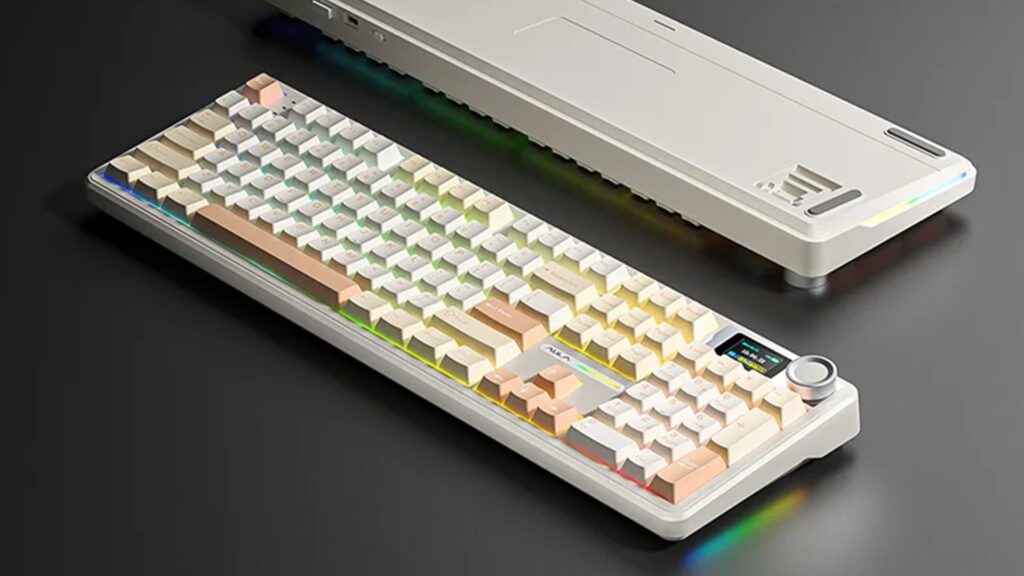
Comparing Aula F108 and F108 Pro Keyboards
Explore key differences between Aula F108 and F108 Pro keyboards.
| Features | Aula F108 | Aula F108 Pro |
|---|---|---|
| Connectivity Modes | Bluetooth 5.0, 2.4G, USB-C wired | Bluetooth 5.0, 2.4G, USB-C wired, 5-device switch |
| Battery Capacity | 4000mAh battery | 8000mAh battery |
| Keycaps Material | Durable PBT keycaps | Oil-resistant PBT keycaps |
| Switch Compatibility | Supports linear MX switches | Supports 3-pin and 5-pin MX switches |
| Noise Dampening | Gasket-mounted structure | Five-layer noise dampening system |
| Smart Display | No display | TFT color smart display |
| Multifunction Knob | No knob | Aluminum multifunction knob |
| Hot-Swappable Support | Limited hot-swap support | Full hot-swap for 3-pin & 5-pin |
| RGB Customization | Customizable RGB with presets | Advanced RGB control via knob/display |
| Weight and Size | 980g, 445×139×41 mm | 1100g, 445×141×43 mm |
You want the best keyboard for your setup, right? The biggest difference between the Aula F108 and Aula F108 Pro comes down to features and customization. Most users find the Aula F108 Pro a better fit, but the aulakeyboard F108 gets rave reviews and strong sales, showing its popularity with many buyers.
Key Takeaways
- The Aula F108 Pro offers more features like a smart display, multifunction knob, bigger battery, and better noise dampening for a premium and quieter typing experience.
- Both keyboards support hot-swappable switches, but the Pro model allows more switch types and advanced customization, making it ideal for enthusiasts and gamers.
- The Aula F108 provides strong value with solid performance and RGB lighting, while the Pro suits users who want extra control, longer battery life, and multi-device convenience.
The difference between the two
Keyboard specifications
You want to see the specs side by side, right? Here’s a quick comparison to help you spot the differences at a glance:
| Specification | Aula F108 | Aula F108 Pro |
|---|---|---|
| Layout | 108 keys, Full-size | 108 keys, Full-size |
| Connectivity | Bluetooth 5.0, 2.4G, Wired | Bluetooth 5.0, 2.4G, Wired |
| Hot-Swappable | Yes | Yes |
| Switch Compatibility | Linear, MX | Linear, 3-pin/5-pin MX |
| Keycaps Material | PBT | PBT |
| Mount Style | Gasket Mount | Gasket Mount, 5-layer dampen |
| Display | None | LCD Smart Display |
| Knob | Yes | Aluminum Multifunction Knob |
| Battery Capacity | 4000mAh | 8000mAh |
| Weight | 980g | 1100g |
| Dimensions (mm) | 445 x 139 x 41 | 445 x 141 x 43 |
| Backlight | RGB | RGB |
Main Differences
When you compare the Aula F108 and the Aula F108 Pro, you notice a few standout features. The Pro model gives you an LCD smart display and an aluminum multifunction knob, which make it easier to control volume, lighting, and modes. You also get hot-swappable support for both 3-pin and 5-pin MX switches, so you can customize your typing feel without any hassle. The Pro’s battery is twice as large, so you can go longer between charges. The five-layer noise dampening and silent design make the Pro a great choice if you want a quieter typing experience. If you want a keyboard that feels premium and offers more control, the aulakeyboard F108 Pro stands out as the top pick.
Design
Build Quality
When you pick up the Aula F108, you feel a solid and sturdy keyboard. The PBT keycaps resist oil and wear, so your keys stay clean and sharp even after long hours of use. The gasket-mounted structure gives you a soft, cushioned typing experience. You get a keyboard that feels premium without being too heavy.
Now, let’s look at the Aula F108 Pro. This model takes build quality up a notch. You still get those durable PBT keycaps, but the Pro adds a five-layer noise dampening system. This means your typing sounds quieter and feels smoother. The Pro also features an aluminum multifunction knob, which not only looks sleek but also feels satisfying to use. The extra weight of the Pro (1100g vs. 980g) gives you a more stable platform, so your keyboard stays put during intense gaming or typing sessions.
Tip: If you want a quieter and more premium feel, the Aula F108 Pro stands out.
Layout
Both keyboards offer a full-size 108-key layout. You get a number pad, function row, and all the keys you need for work or play. The layout feels familiar, so you won’t need to adjust your typing habits.
- Aula F108: Classic full-size layout, easy to use for both gaming and productivity.
- Aula F108 Pro: Same layout, but with added features like the smart display and multifunction knob for quick controls.
You get the same key placement on both, but the Pro’s extras make your experience more interactive and convenient.
Switches

Types and Feel
When you look at the switches on the Aula F108 and Aula F108 Pro, you notice some key differences. Both keyboards support hot-swappable switches, so you can change them out without any tools. This feature lets you try different switch types until you find the one that feels just right.
The Aula F108 supports linear MX-style switches. You get a smooth and consistent keystroke every time you type or game. If you like a fast, quiet press with no tactile bump, you will enjoy this setup.
The Aula F108 Pro takes things further. You get compatibility with both 3-pin and 5-pin MX switches. This means you have more options for customizing your typing feel. Want a clicky switch? Prefer a tactile bump? You can swap them in easily. The Pro model gives you more freedom to experiment and find your perfect match.
Tip: If you love customizing your keyboard, the F108 Pro gives you more flexibility.
Sound and Comfort
Sound matters, especially if you type a lot or work in a shared space. The Aula F108 offers a satisfying typing sound thanks to its gasket mount and PBT keycaps. You get a soft, cushioned feel with every press.
The Aula F108 Pro stands out with its five-layer noise dampening system. You notice a much quieter typing experience. The Pro’s design absorbs sound and reduces vibration, so you can type late at night or in the office without disturbing anyone.
- Aula F108: Crisp, satisfying sound and comfortable feel.
- Aula F108 Pro: Ultra-quiet, soft keystrokes with extra comfort.
You get comfort and sound quality with both, but the Pro model delivers a quieter and more refined experience.
Backlighting

RGB Options
You want your keyboard to look as good as it feels, right? Both the Aula F108 and Aula F108 Pro deliver when it comes to RGB lighting. Each keyboard offers vibrant, full-spectrum RGB backlighting. You get about 16 million color choices, so your setup can match your mood or your gaming rig.
The Aula F108 gives you several preset lighting effects. You can switch between wave, ripple, breathing, and static modes with just a few key presses. The lights shine bright and even, making every key pop.
The Aula F108 Pro takes things a step further. You still get all the classic RGB effects, but the lighting feels richer and more dynamic. The Pro’s five-layer dampening system helps diffuse the light, so the colors look smoother and more consistent across the board.
Tip: If you want a keyboard that stands out on your desk, both models deliver. The Pro just adds a little extra polish.
Customization
You love to tweak your setup, don’t you? Both keyboards let you customize the RGB lighting to fit your style. You can adjust brightness, speed, and color patterns right from the keyboard. The Aula F108 makes it easy with simple key combinations.
The Aula F108 Pro gives you even more control. The smart display and multifunction knob let you change lighting modes and colors on the fly. You don’t need to dig through software menus. Just turn the knob or tap the display, and your keyboard transforms instantly.
- Aula F108: Customizable RGB with easy shortcuts.
- Aula F108 Pro: Advanced controls with the knob and display for real-time changes.
You get flexibility with both, but the Pro makes customization faster and more fun.
Connectivity
Tri-Mode Support
You want a keyboard that keeps up with your busy life. Both the Aula F108 and Aula F108 Pro deliver tri-mode connectivity. You can switch between Bluetooth 5.0, 2.4 GHz wireless, and USB-C wired modes. This means you can use your keyboard with almost any device you own.
The F108 Pro gives you a little extra. You can connect to up to five devices at once and switch between them using the multifunction knob. This feature makes it easy if you work on a laptop, tablet, and desktop throughout your day. The 2.4 GHz wireless and USB-C wired modes offer a fast 1000Hz polling rate, so you get instant response whether you’re gaming or typing.
Tip: If you love multitasking or use several devices, the F108 Pro’s quick-switch feature will save you time.
Compatibility
You don’t want to worry about whether your keyboard will work with your devices. Both the Aula F108 and F108 Pro support a wide range of operating systems. You can use them with:
- Windows PCs and laptops
- Mac computers
- iOS devices like iPads and iPhones
- Android tablets and phones
Bluetooth mode lets you pair with almost anything, from your main computer to your tablet for note-taking. The F108 Pro’s smart display and knob make switching even easier. On Linux, you might see some limited features, but basic typing works fine.
You get broad compatibility with both models, but the Pro’s device-switching and display make it even more convenient for a multi-device setup.
Battery
Capacity
When you look at battery capacity, you see a clear difference between the Aula F108 and the Aula F108 Pro. The F108 comes with a 4000mAh battery. The F108 Pro doubles that with a massive 8000mAh battery. This means you get more power and longer use from the Pro model.
Here’s a quick comparison:
| Model | Battery Capacity |
|---|---|
| Aula F108 | 4000mAh |
| Aula F108 Pro | 8000mAh |
If you want a keyboard that lasts longer between charges, the F108 Pro stands out. You can go days or even weeks without worrying about plugging it in.
Note: A bigger battery means less time spent charging and more time enjoying your keyboard.
Usage Time
You probably wonder how long each keyboard will last on a single charge. The Aula F108 gives you up to 30+ days of use with the RGB lights off. If you like some color, you get around 60 hours at medium brightness or about 30 hours with dynamic RGB effects.
The Aula F108 Pro takes things further. With its larger battery, you can expect even longer usage times. You can use the Pro for extended periods, even with the RGB lighting on. This makes it perfect if you hate frequent charging or use your keyboard all day.
- Aula F108: Great for regular use, especially if you turn off the lights.
- Aula F108 Pro: Ideal for heavy users who want maximum battery life.
If you want a keyboard that keeps up with your busy schedule, the F108 Pro is the clear winner in battery performance.
Extra Features
Knob and Screen
You want your keyboard to do more than just type, right? The Aula F108 Pro brings some serious upgrades that you can actually see and feel every day. The most eye-catching addition is the built-in intelligent TFT color smart display. This little screen sits right on your keyboard and gives you real-time updates. You can check the date and time, see your battery status, and even switch between different connection modes. Want to show off a custom GIF or tweak your backlight settings? You can do that straight from the display. It feels like having a mini dashboard at your fingertips.
The Pro model also features an aluminum multifunction knob. This knob lets you adjust volume, change lighting effects, and switch between devices with a simple twist or press. You don’t have to fumble with key combinations or software. Just reach for the knob and make changes instantly. If you work or play across several devices, you’ll love how easy it is to switch between up to five saved connections. The standard Aula F108 gives you a solid typing experience, but it doesn’t have a smart display or a multifunction knob. If you want more control and a modern look, the Pro’s extras make a big difference.
Tip: The smart display and knob on the F108 Pro turn your keyboard into a command center. You get more information and control without leaving your seat.
Hot-Swap and Macros
You like to customize your gear, don’t you? The Aula F108 Pro makes it easy. It supports hot-swappable switches that work with both 3-pin and 5-pin MX-style switches. You can swap out your switches for a different feel or sound without any tools or soldering. Maybe you want clicky switches for gaming and silent ones for work. You can change them in seconds. The Pro also comes with pre-lubricated stabilizers and switches, so every keypress feels smooth right out of the box.
Macros are another area where the Pro shines. You can program complex key combinations or shortcuts using the Pro’s software. This means you can set up custom actions for gaming, work, or creative projects. The RGB backlighting is also fully programmable, so you can match your keyboard to your style or workflow.
The standard Aula F108 supports hot-swapping, but only for certain switch types. It doesn’t offer the same level of compatibility or customization as the Pro. You also won’t find advanced macro programming or the same depth of RGB control. If you want a keyboard that adapts to your needs and grows with your skills, the Aula F108 Pro gives you the tools to do it.
If you love to tweak and personalize your setup, the F108 Pro’s hot-swap support and macro features open up a world of possibilities.
Here’s a quick look at what sets the Aula F108 Pro apart:
- Smart TFT color display for real-time info and customization
- Aluminum multifunction knob for quick controls
- Hot-swappable base for both 3-pin and 5-pin switches
- Pre-lubricated stabilizers and switches for smooth typing
- Five-layer noise dampening for a quieter experience
- Advanced macro and RGB customization
You get a lot more than just a keyboard with the Aula F108 Pro. You get a tool that fits your workflow, your style, and your daily routine.
Aulakeyboard Value
Price
You want to get the most for your money, right? When you look at the Aula F108 and Aula F108 Pro, you see a clear difference in price. The Aula F108 usually costs less. It gives you a solid mechanical keyboard with tri-mode connectivity, RGB lighting, and a comfortable typing experience. If you want a reliable keyboard without spending too much, this model fits your needs.
The Aula F108 Pro sits at a higher price point. You pay more, but you get extra features like the smart display, multifunction knob, hot-swappable support for more switches, and a bigger battery. These upgrades make the Pro feel more premium and future-proof. If you love customizing your setup or want the latest features, the Pro offers great value.
| Model | Typical Price Range |
|---|---|
| Aula F108 | $70 – $90 |
| Aula F108 Pro | $110 – $140 |
Tip: If you want advanced features and a premium feel, the Pro is worth the extra cost.
Warranty
You want peace of mind when you buy a new keyboard. Both models from aulakeyboard come with a standard warranty. This covers you against defects and problems that might show up after you start using your keyboard. Most buyers find the warranty process easy and helpful. You can reach out to aulakeyboard support if you ever need help.
The warranty length is usually one year for both models. This gives you enough time to spot any issues and get them fixed. If you want extra coverage, you can often buy an extended warranty for a small fee.
Note: Always check the warranty details before you buy. This helps you know what is covered and how to get support if you need it.
When you compare both models, you see that the aulakeyboard F108 Pro gives you more features for a higher price, while the F108 offers strong value at a lower cost. Think about what matters most to you—features or budget—before you decide.
Recommendations
For Gamers
If you love gaming, you want a keyboard that keeps up with your fast moves. Both the Aula F108 and Aula F108 Pro give you a full-size layout and fast response times. You get tri-mode connectivity, so you can play on your PC, laptop, or even your tablet.
But the Aula F108 Pro stands out for gamers who want more control and features. You get:
- An aluminum multifunction knob for quick volume and lighting changes during intense matches.
- A smart display that shows connection status and battery life, so you never get caught off guard.
- Hot-swappable support for both 3-pin and 5-pin switches, letting you pick the perfect switch for your play style.
- Five-layer noise dampening for quieter late-night gaming.
Tip: If you want a keyboard that feels premium and gives you more ways to customize your setup, the F108 Pro is the top pick for gamers. If you want a solid, reliable keyboard at a lower price, the F108 still delivers great performance.
For Office
You spend hours typing at work, so comfort and quiet matter. Both keyboards offer a soft, cushioned typing feel with PBT keycaps that resist oil and wear. You get a full number pad for spreadsheets and data entry.
The Aula F108 Pro gives you extra features that make office life easier:
- Five-layer noise dampening for a quieter workspace.
- A smart display that shows the time, battery, and connection mode at a glance.
- A multifunction knob for quick volume adjustments during calls or meetings.
- Hot-swappable switches, so you can choose silent switches for a distraction-free environment.
| Feature | Aula F108 | Aula F108 Pro |
|---|---|---|
| Noise Dampening | Gasket mount | Five-layer |
| Smart Display | No | Yes |
| Multifunction Knob | No | Yes |
| Hot-Swap Compatibility | Limited | 3-pin & 5-pin |
If you want a quiet, comfortable keyboard with smart features for the office, the F108 Pro is the better choice. The F108 still works well if you want a simple, dependable keyboard for daily tasks.
For Enthusiasts
You love to tweak and personalize your gear. Both keyboards let you swap switches, but the Aula F108 Pro gives you more options and tools to play with.
- Hot-swappable support for both 3-pin and 5-pin MX switches.
- Pre-lubricated stabilizers and switches for a smoother feel.
- Advanced macro programming and RGB customization.
- A smart TFT display and aluminum knob for real-time control.
Note: If you want a keyboard that grows with your hobby and lets you experiment, the F108 Pro is the clear winner. You get more ways to make your keyboard truly yours. The F108 is a great starting point, but the Pro unlocks the full enthusiast experience.
FAQ
Can I use both keyboards with Mac and Windows?
Yes, you can use both models with Mac and Windows. Just switch modes for your device. You get broad compatibility for work or play.
Which keyboard is better for quiet typing?
The Aula F108 Pro gives you a quieter experience. Its five-layer noise dampening system absorbs sound, so you can type without disturbing others.
Do both keyboards support switch swapping?
You can swap switches on both. The F108 Pro supports more switch types, so you get extra flexibility for customizing your typing feel.






Add comment
You must be logged in to post a comment.