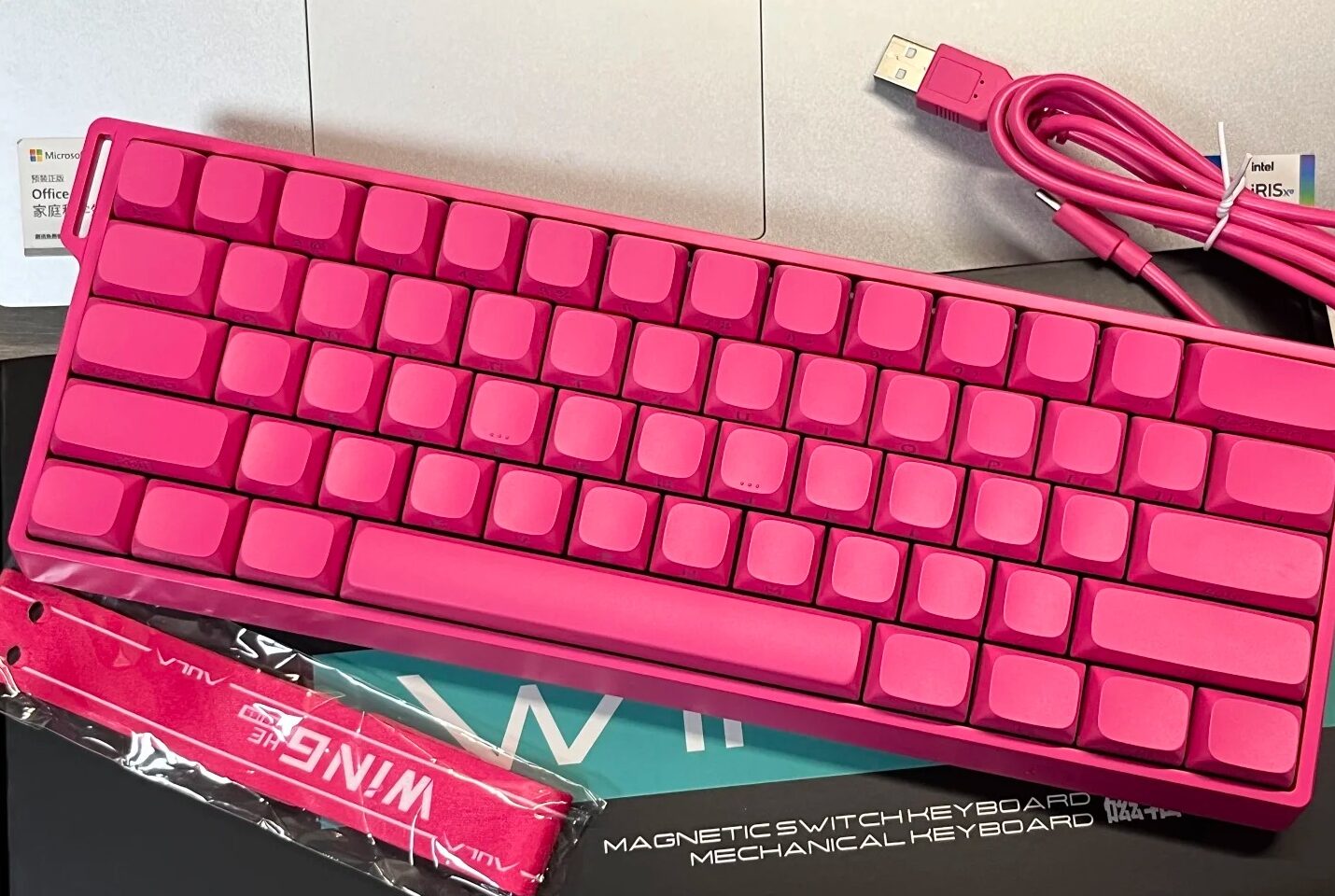
Aula Best Hall Effect Keyboard – Ultimate Gaming Experience
You want the best value in gaming keyboards. Aula gives you advanced Hall effect technology, fast response, and top build quality without breaking your budget. Users rave about the typing feel and sound, often comparing it to much pricier options. One gamer said, “I can’t believe the Aula HERO 68Mini costs so little. It sounds better than my $200 custom build from 2020.” The Hall-Effect Gaming Keyboard market keeps growing fast, showing that more people choose this smart upgrade every year.
Aula AG60
Features
You want a keyboard that feels fast and powerful. The Aula AG60 gives you that edge. This model uses advanced magnetic Hall effect switches. Every key press feels smooth and instant. You get an 8000Hz polling rate and just 0.1ms average latency. That means your actions show up on screen right away. You can switch between a soft or firm typing feel with one key press. This makes the AG60 perfect for both gaming and typing. The dual-engine structure adds stability and lets you play for hours without losing comfort.
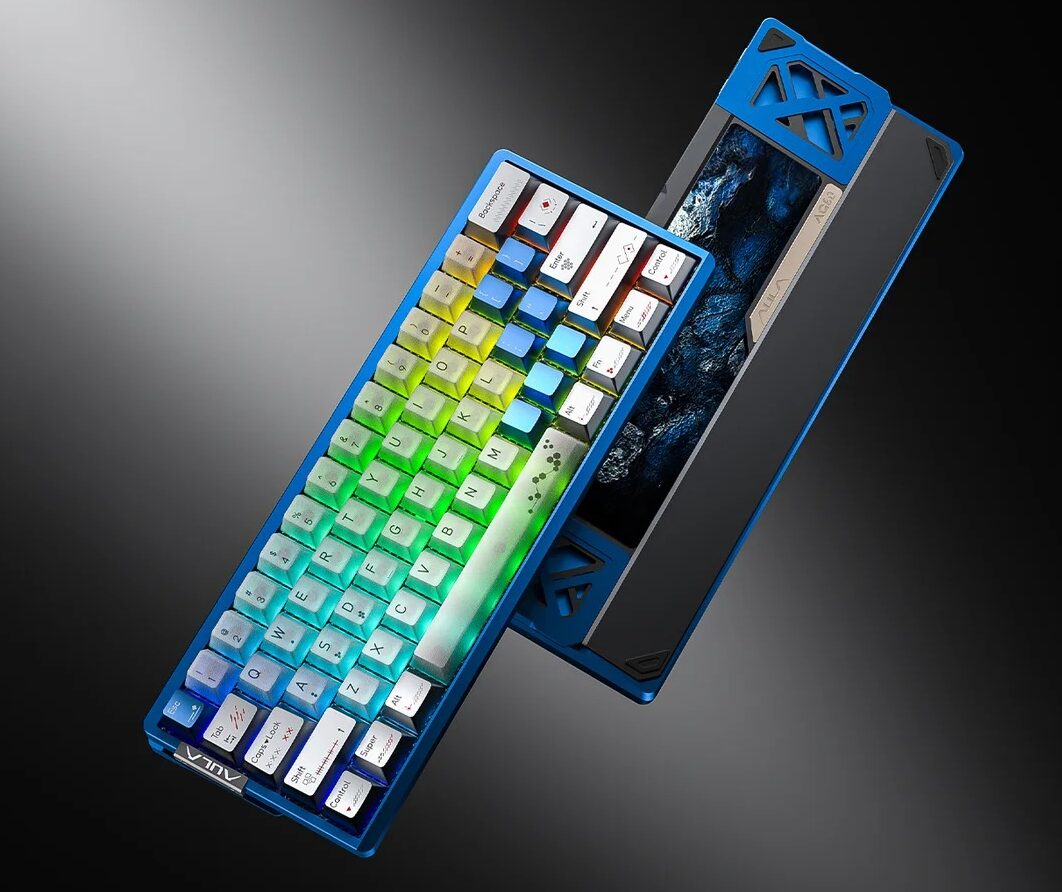
The AG60 stands out with its CNC anodized aluminum body and carbon fiber positioning plate. These materials make the keyboard strong and stylish. The five-layer acoustic padding keeps your typing quiet and enjoyable. You also get bright RGB under-glow lighting with millions of color options. The white fog-through keycaps let the colors shine through, making your desk look amazing.
Key Technical Specifications
| Specification | Details |
|---|---|
| Build Material | CNC Anodized Aluminum Body |
| Switch Type | Magnetic Switch |
| Polling Rate | 8,000Hz |
| Layout | 60% QWERTY ANSI US |
| Number of Keys | 61 Keys |
| Case Structure | Dual-Engine Structure |
| Product Weight | 0.972kg |
| Product Size | 298.33mm x 110.2mm x 40.94mm |
Layout
You get a compact 60% layout with the Aula AG60. This design saves desk space and gives you more room for your mouse. If you play FPS games or need a clean setup, this keyboard fits perfectly. The 61-key QWERTY ANSI US layout covers all your main functions. You can reach every key quickly, so you never lose speed in games or work.
Price
You do not have to spend a lot to get top features. The Aula AG60 offers high-end specs at a budget price. You get premium build quality, advanced switches, and stunning lighting for much less than other Hall effect keyboards. This model is the best choice if you want a 60% layout and want to save money without giving up performance.
Aula MK60
Features
You want a keyboard that is fast and looks cool. The Aula MK60 gives you both. It has two strong control chips like those in cars. This makes the polling rate super high at 8,000Hz. The key scanning rate is also very fast at 2,304K. Every time you press a key, it works right away. You will not miss any moves in your games. The “Ice King” magnetic switches feel smooth and easy to use. Typing and gaming are simple with these switches.
The body is made from strong 6063 aluminum. It also has shiny stainless steel weights and a mirror finish. These parts make the MK60 tough and nice to look at. There are five layers inside to keep typing quiet and soft. You can pick from three ways to mount the keyboard. This lets you change how it feels to match what you like.
Note: The MK60 has 130 ARGB LEDs and two lighting zones for each key. This makes your desk light up with amazing colors.
Price
You want the best keyboard, and the MK60 is at the top. It costs between $200 and $300. This is more than most budget keyboards. The high price is because of its cool features, strong build, and ways to change it. If you want a keyboard that looks and feels special, the MK60 is a good choice.
Costs $200–$300
Has advanced features and strong materials
Made for gamers and workers who want the best
Aula HERO68HE Ultra
Features
You want a keyboard that gives you an edge in every game. The Aula HERO68HE Ultra brings you advanced magnetic switch technology for the fastest response. You can adjust the actuation point from 0.1mm to 3.4mm. This means you control how quickly each key responds. The ultra-fast 8,000Hz polling rate and 128K scan rate make every keystroke instant. You get near-zero latency, so your actions happen right away.
Here is a quick look at the top features:
| Switch Type | Hall effect magnetic switches |
| Polling Rate | 8,000Hz for ultra-responsive performance |
| Actuation Point | Adjustable from 0.1mm to 3.4mm (0.01mm accuracy) |
| Latency | Ultra-low, only 0.125ms |
| Scan Rate | 128K for near-zero delay |
| Fast Trigger Mode | Instant key registration for competitive gaming |
You can swap out switches without soldering. The five-layer acoustic stack gives you a satisfying “thock” sound. The keyboard also supports hot-swappable magnetic switches, so you can change the feel anytime.
Tip: Use Fast Trigger Mode for FPS games. You will notice instant stops and starts, giving you a real advantage.
Layout
The HERO68HE Ultra uses a 68-key compact layout. You save desk space and keep all the keys you need for gaming or work. The design fits perfectly in small setups and lets you move your mouse freely. The keyboard comes in several colors, so you can match your style. The 5-side dye-sublimation keycaps stay bright and clear, even after heavy use.
Price
You get premium features at a price that makes sense. The Aula HERO68HE Ultra costs between $80.98 and $132.98. You pay less than for many high-end boards but get top-level performance. If you want a keyboard that delivers speed, style, and value, this is your best pick.
Aula Hero68 mini
Features
You want a keyboard that is fast and cool. The Hero68 mini gives you all of that. You can change how sensitive each key is from 0.01mm to 3.4mm. This means you pick how hard you need to press. The 8,000Hz polling rate makes your moves show up right away. You can swap out switches without any tools. This helps you find the best feel for games or work.
The Hero68 mini has bright RGB lights and clear letters. You can see every key, even when it is dark. The metal top and quiet layers make typing soft and nice. This keyboard looks awesome and feels great to use.
Here is a quick list of what you get:
| Adjustable Actuation | Set key sensitivity from 0.01mm to 3.4mm |
| 8K Polling Rate | Ultra-fast response for gaming |
| Hot-Swap Compatibility | Change switches easily |
| Shine-Through Letters | Clear keys with RGB for low-light use |
| Stylish Design | Metal panel and sound-dampening for a premium feel |
Layout
The Hero68 mini has 68 keys in a small size. This saves space on your desk and gives you more room for your mouse. You still get all the keys you need for games and typing. The keyboard is light because it is made of aluminum. You can take it anywhere, like to a tournament or a friend’s house. The design works for gaming or work setups.
Price
You want a good deal for your money. The Hero68 mini costs between $154.00 and $160.00. You get features that other brands do not give you at this price. You can swap switches, use three ways to connect, and the battery lasts a long time. Other brands charge more and give you less. The Hero68 mini is quiet and has cool RGB lights you can change. You get a top keyboard without paying too much.
| Feature | Aula Hero68 mini | Competitors (Corsair, Keychron) |
|---|---|---|
| Price Range | $154.00 – $160.00 | Similar price points |
| Hot-Swappable Switches | Yes | Limited options |
| Tri-Mode Connectivity | Yes | Often not available |
| Customizable RGB Lighting | Yes | May lack this feature |
| Battery Life | Long | Often shorter |
| Quiet Operation | Yes | Not guaranteed |
Note: The Hero68 mini gives you more features and better value. Pick Aula if you want a great upgrade.
Aula Mini 60
Features
You want a keyboard that fits your busy life. The Aula Mini 60 gives you everything you need in a small package. This keyboard uses magnetic mechanical switches that react instantly to your touch. You can pick from three switch types: Wind Cloud, Smoke Cloud, and Spirit Cloud. Each one feels different, so you can find the perfect match for your style.
You get tri-mode connectivity. Switch between Bluetooth, 2.4GHz wireless, or USB-C wired in seconds. This means you can use the Mini 60 with your PC, Mac, or even your tablet. The hot-swappable design lets you change switches without tools. You can make your keyboard feel new anytime.
The Mini 60 also keeps things quiet. It uses a multi-layer sound dampening system. You will enjoy a soft, pleasant typing sound every time you use it.
Layout
The Aula Mini 60 uses a 60% layout. You get 61 keys in a compact design. This saves space and gives you more room for your mouse. The keyboard is light and easy to carry. You can take it to school, work, or a gaming event.
| Layout Type | 60% |
| Number of Keys | 61 |
| Connectivity Options | Bluetooth, 2.4GHz, USB-C |
You still have all the main keys you need for gaming and typing. The PBT keycaps and aluminum alloy plate make the keyboard strong and long-lasting.
Price
You want value for your money. The Aula Mini 60 gives you advanced features at a price you can afford. You get premium materials, fast switches, and cool lighting for less than many other brands. This keyboard is perfect if you want top performance without spending too much.
Note: The Mini 60 is a smart choice for students, gamers, and anyone who wants a high-quality keyboard at a great price.
Aula vs Wooting
You want the best technology for your keyboard. Both Aula and Wooting use advanced Hall effect switches. These switches give you fast response and long-lasting durability. You can adjust the actuation point on both brands, which means you control how sensitive each key feels. Aula lets you set actuation from 0.1mm to 3.4mm, while Wooting offers a similar range. Both brands use high polling rates, up to 8000Hz, so your actions show up instantly.
Here’s a quick technical comparison:
| Spec | Aula HERO68HE Ultra | Wooting 60HE |
|---|---|---|
| Actuation Point | 0.1–3.4mm adjustable | 0.1–4.0mm adjustable |
| Polling Rate | 8000Hz | 1000–8000Hz |
| Switch Type | Hall Effect Magnetic | Lekker Magnetic |
| Build Material | Aluminum/Metal | Plastic |
| Price Range | $40–$160 | $175–$200+ |
Features
You want a keyboard that fits your style. Aula and Wooting both let you remap keys and set up macros. Aula uses the HIVE driver for simple, real-time changes. Wooting uses the Wootility app, which gives you more advanced options and lighting controls. If you love deep customization, Wooting offers more layers and RGB profiles. If you want easy setup and solid features, Aula makes it simple.
| Feature | Aula WIN60 HE | Wooting 60HE |
|---|---|---|
| Software Interface | HIVE driver (simple) | Wootility (advanced) |
| Key Remapping | Easy with presets | Multi-layer, onboard |
| Lighting Controls | Basic RGB effects | Full RGB profiles |
| Customization Depth | Macros, keycodes | Deep actuation, tracking |
Price
You want value for your money. Aula gives you premium features at a lower price. Most Aula models cost between $80 and $160. Wooting keyboards start at $175 and can go over $200. You save money with Aula and still get top specs and build quality.
Aula: $40–$160 for most models
Wooting: $175–$200+ for similar features
If you want a keyboard that feels premium, sounds great, and saves you money, Aula is the smart choice.
Why Choose Aula
Value
You want the best deal for your money. Aula gives you premium features at a price you can afford. Many users say the WIN60HE feels like a custom keyboard but costs less than $100. You get Hall Effect switches, fast response, and a solid build. The keyboards use gasket structures and soft cotton layers for comfort. You can type or game for hours without feeling tired. The design lets you show your style and enjoy top performance.
- Tip: Aula keyboards are easy to clean and maintain. You can keep your setup fresh and working like new.
User Experience
You want a keyboard that feels great every time you use it. Aula gives you advanced Hall Effect magnetic switches. You get fast, smooth keystrokes with a trigger range from 0.01mm to 3.4mm. The 8000Hz polling rate means your actions show up instantly. You can mix different switches for a custom feel. The keyboards scan each key quickly, so you never miss a move.
Aula keyboards are easy to use and set up.
Many users say they sound and feel better than other brands.
You get comfort, speed, and style in one package.
You want a keyboard that has cool features and saves money. Aula is special because it has tri-mode connectivity and hot-swappable switches. The price is under $100, so it is great for gamers and fans. People like how much they get for the price. Experts say Aula’s Hall effect technology is the best for budget gaming.
| Feature | Aula Advantage | Typical Competitors |
|---|---|---|
| Price Point | Under $100 (Best Value) | Often $150+ for similar specs |
| Connectivity | Tri-Mode (BT / 2.4G / Wired) | Often Wired Only in budget range |
| Gaming Tech | Hall Effect (Magnetic) | Standard Mechanical |
| Customization | Hot-Swappable Switches | Soldered / Fixed Switches |
| Verdict | Top Choice for Budget Gaming | Entry-level options |
FAQ
What makes Hall Effect keyboards better for gaming?
You get instant key response with Hall Effect switches. Rapid Trigger lets you stop and start movement right away. This gives you a big advantage in FPS games. You will notice faster reactions and smoother gameplay.
Can I customize Aula keyboards easily?
Yes! You can swap switches without tools. You can also change RGB lighting and remap keys using Aula’s software. You get full control over your keyboard’s look and feel.
Are Aula keyboards good for typing and work?
Absolutely. You enjoy a soft, quiet typing sound and a comfortable feel. The build quality supports long hours of use. Many users say Aula keyboards work great for both gaming and daily tasks.
How do I connect my Aula keyboard?
You can use Bluetooth, 2.4GHz wireless, or USB-C wired mode. Switching between devices is quick and simple. You stay connected wherever you work or play.
Is Aula a good value compared to other brands?
Yes! You pay less but get premium features. Aula offers advanced Hall Effect technology, strong build quality, and great sound. You save money and still get top performance.

Add comment
You must be logged in to post a comment.