


Keyboard Sizes Explained: A Complete Guide to All Form Factors
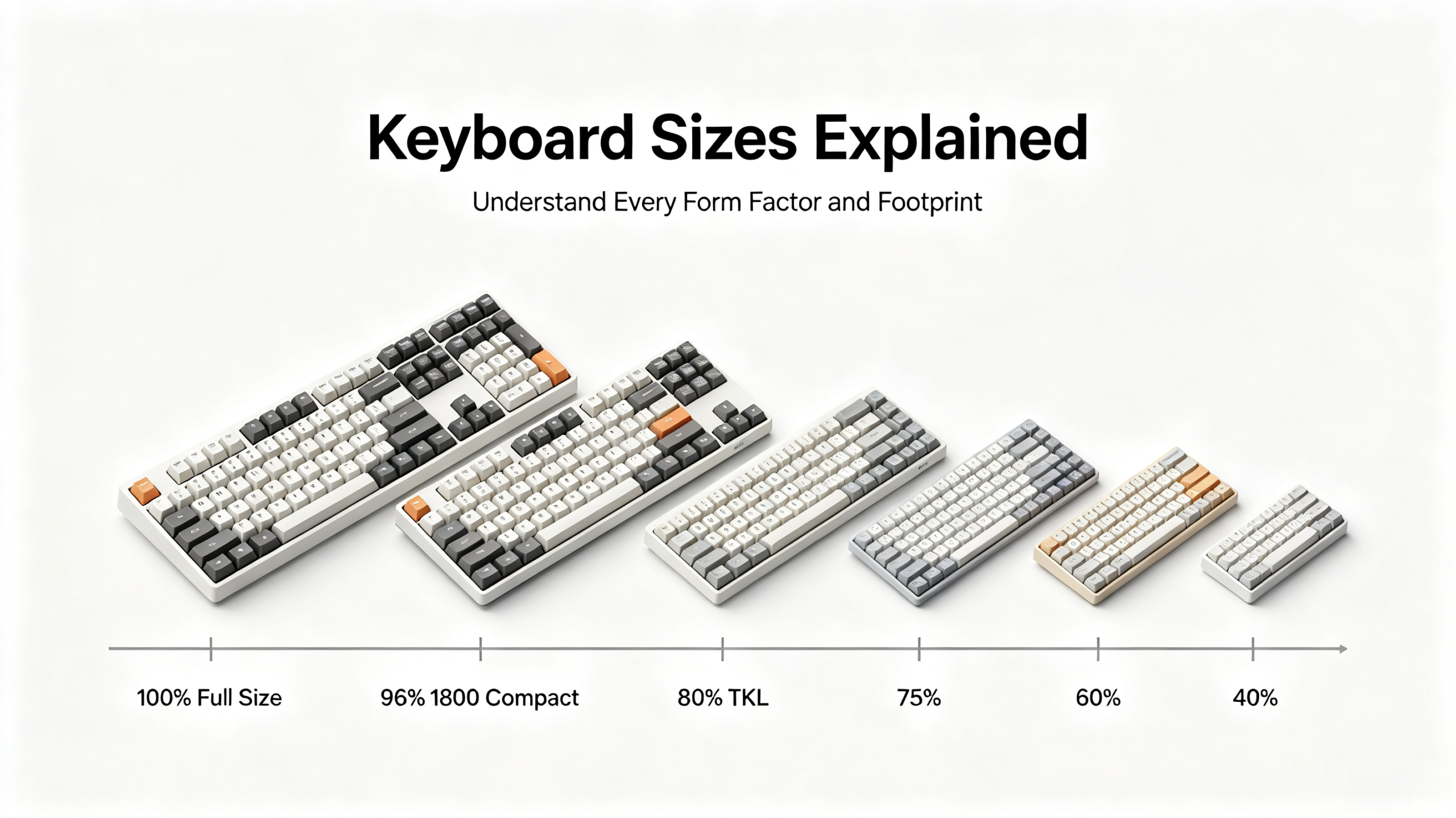
2. Why Keyboard Size Matters More Than You Think
Choosing a keyboard size is not merely an aesthetic preference. It has direct, measurable consequences for your comfort, productivity, and the ergonomics of your entire desk setup.
2.1 Desk Space & Setup Aesthetics
The physical footprint of your keyboard determines how much room remains for your mouse, notebook, coffee cup, and monitor stand. A standard full-size keyboard occupies roughly 44–46 cm of horizontal desk space. Remove the numpad and switch to a TKL, and you immediately reclaim 7–9 cm — enough to shift your mouse closer to the centre of your body and dramatically reduce shoulder strain over a long working day. For anyone running a dual-monitor setup or working on a standing desk with limited surface area, this difference is not trivial.
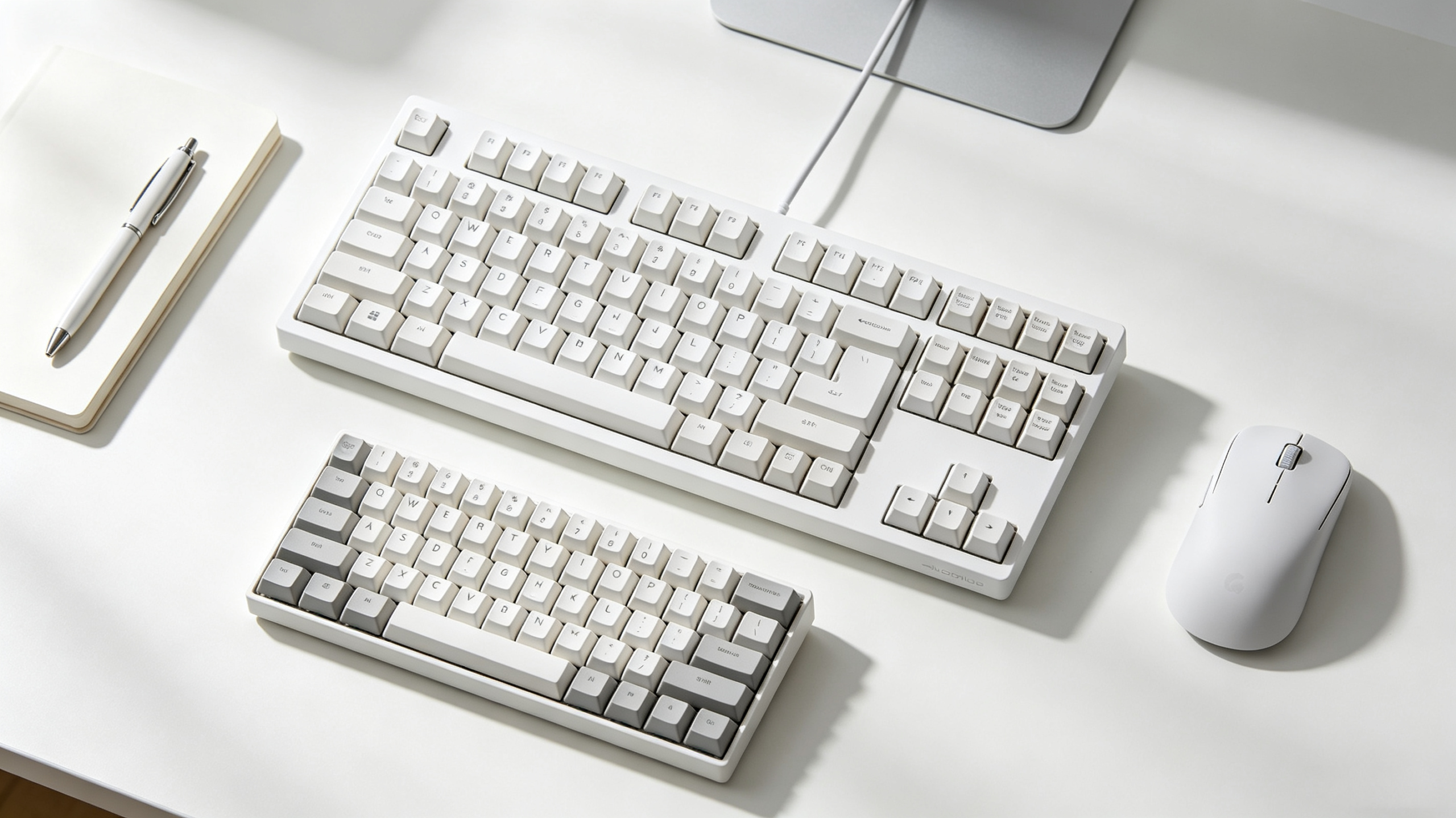
Compact keyboards also tend to look cleaner and more intentional on a desk. The growing popularity of minimalist home-office aesthetics across Germany, the Netherlands, and Scandinavia has driven significant interest in 65% and 75% boards among users who want a tidy, professional-looking setup without sacrificing too much functionality.
2.2 Portability for Commuting & Travel
2.3 Typing & Gaming Ergonomics
2.4 Workflow Efficiency (Numpad, Function Keys, Navigation)
3. How We Classify Keyboard Sizes
<, >, and \ in many European languages. As a result, an ISO full-size keyboard has 105 keys, while its ANSI counterpart has 104 keys. This difference carries through every form factor: ISO TKL boards have 88 keys versus 87 for ANSI, and so on. For a deeper look at how these two standards differ, see our guide to [ISO vs ANSI keyboard layout].4. Every Keyboard Size Explained in Detail
4.1 Full Size Keyboard (100%) — 104/105 Keys
4.2 1800 Compact / 96% Keyboard — 96–98 Keys
4.3 Tenkeyless (TKL / 80%) Keyboard — 87/88 Keys
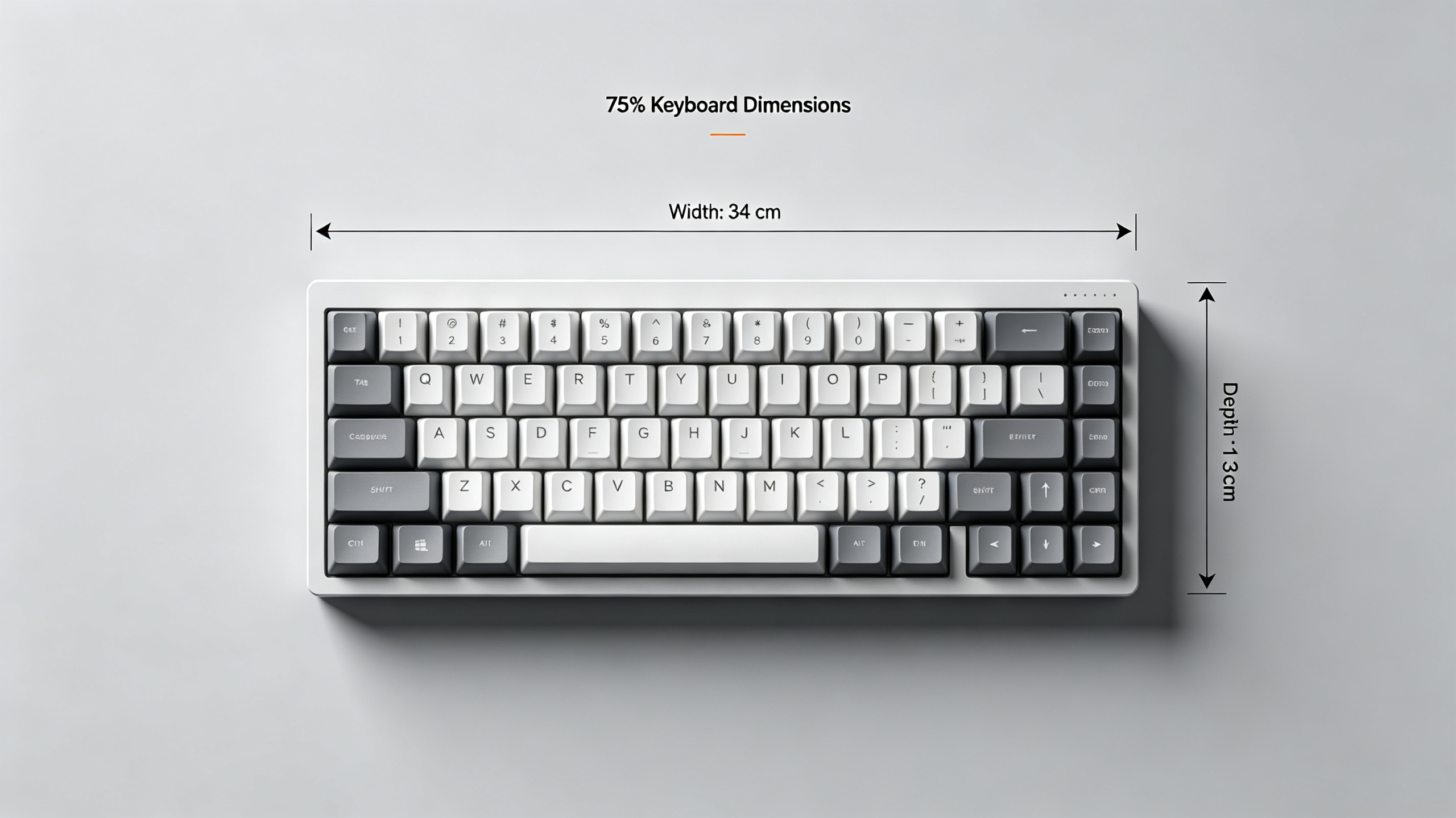
4.4 75% Keyboard — 84–87 Keys
4.5 65% Keyboard — 67–68 Keys
4.6 60% Keyboard — 61–62 Keys
4.7 40% Keyboard & Ultra-Compact Form Factors
4.8 Niche Sizes: Alice Layout, Split Keyboards & Standalone Numpads
5. Keyboard Size Comparison: Side-by-Side Breakdown
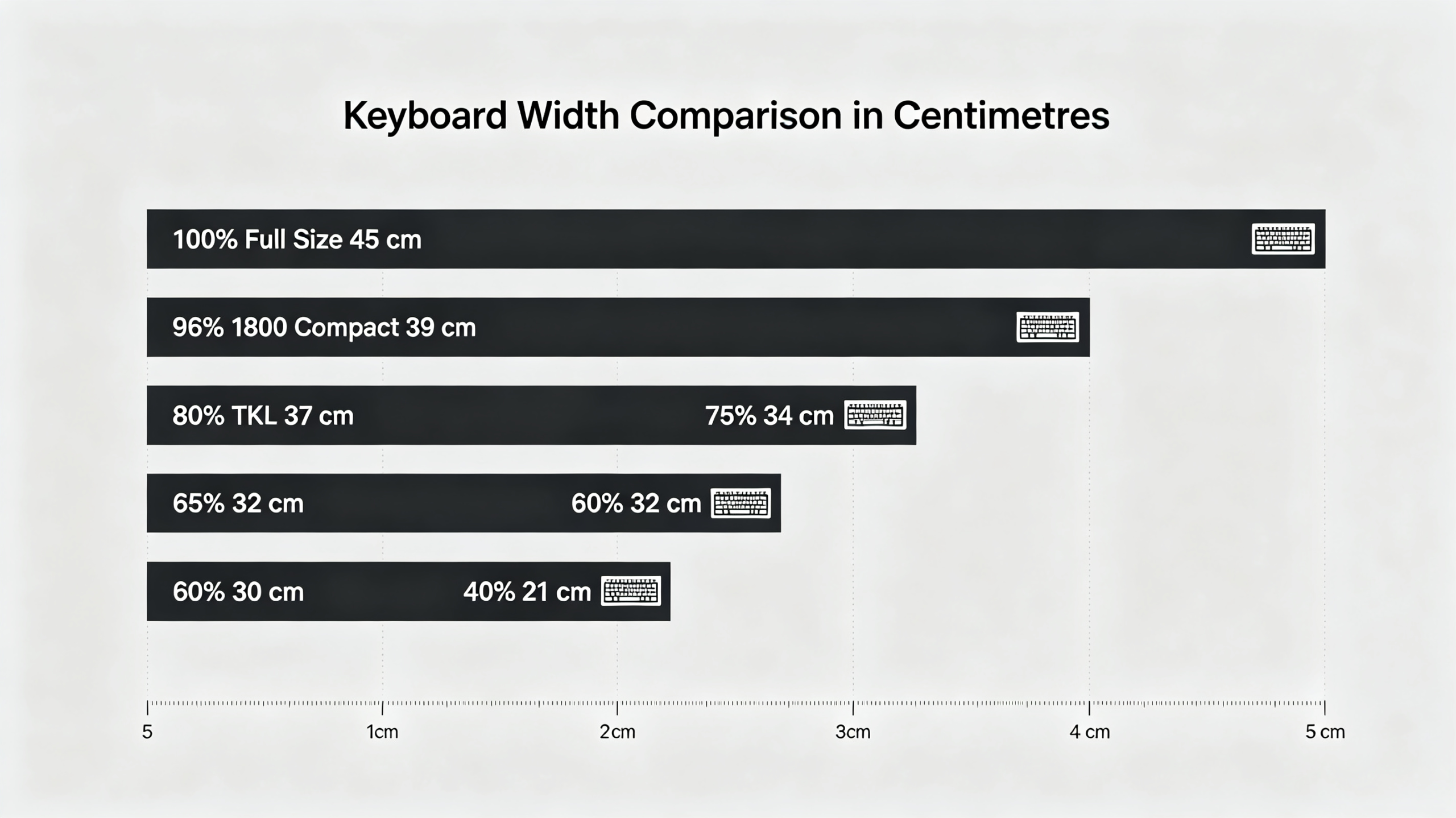
The table below provides a direct keyboard size comparison across all mainstream form factors, using ISO layout values where applicable.
| Form Factor | Key Count ISO | Typical Width | Numpad | Function Row | Portability | Ideal Use Case |
|---|---|---|---|---|---|---|
| Full Size 100% | 105 | 44-46 cm | Yes | Yes | Low | Data entry, office productivity |
| 1800 Compact 96% | 97-98 | 38-40 cm | Yes | Yes | Low-Medium | Compact numpad users |
| Tenkeyless TKL / 80% | 88 | 36-38 cm | No | Yes | Medium | Gaming, general office use |
| 75% | 84-87 | 32-35 cm | No | Yes | Medium-High | Programming, travel typing |
| 65% | 67-68 | 31-33 cm | No | Via Fn layer | High | Minimalist setups, enthusiasts |
| 60% | 61-62 | 29-31 cm | No | Via Fn layer | Very High | Custom builds, travel |
| 40% | 40-48 | 23-26 cm | No | Via Fn layer | Extremely High | Hobbyists, ergonomic builds |
6. How to Choose the Right Keyboard Size for You
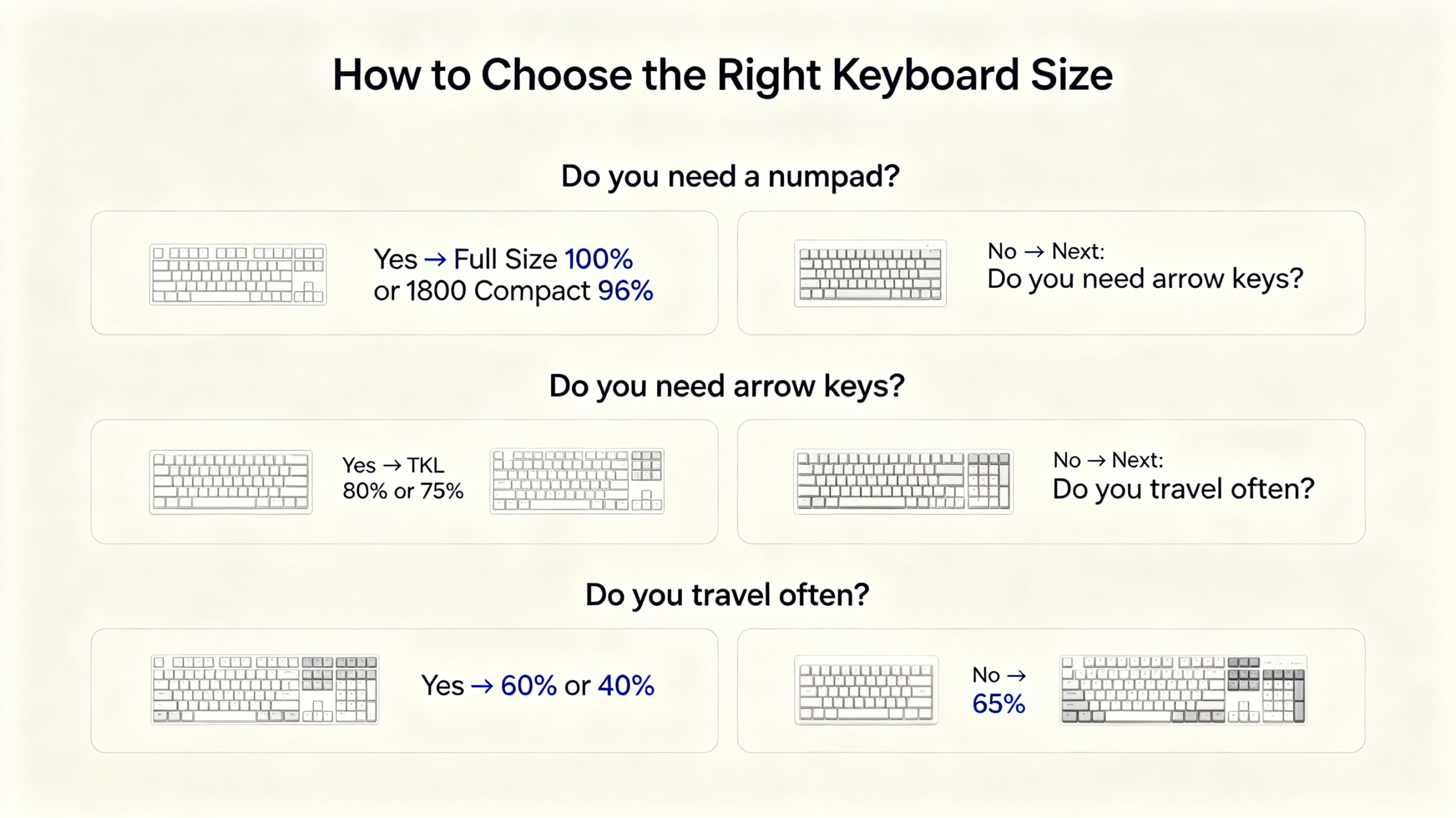
The following framework will guide you to the right form factor in five steps. Answer each question honestly based on your actual daily workflow, not your aspirational one.
6.1 Measure Your Desk Space First
Before considering anything else, measure the horizontal space available on your desk. Use a tape measure and note the distance from the edge of your monitor stand (or the left boundary of your workspace) to the right edge of where your mouse needs to reach. A useful rule of thumb: allow at least 15–20 cm of clear space to the right of the keyboard for comfortable mouse movement. If your total available width is 60 cm or less, a full-size keyboard will leave you cramped. If it is under 50 cm, a TKL or smaller is strongly advisable.
6.2 Prioritise Your Primary Use Case
Your dominant daily activity should drive the size decision. Office and productivity work generally benefits from a TKL or full-size board, depending on numpad needs. Gaming almost universally benefits from a TKL or smaller, as mouse room is critical. Programming suits a 75% or TKL well, since F-keys are frequently used for IDE shortcuts. Commuting or travel points clearly toward a 65% or 60% board. If you split your time between multiple use cases, the TKL is typically the safest all-rounder.
6.3 Do You Really Need a Numpad?
This is the most important single question in the keyboard size decision. Be honest: do you enter numerical data regularly, or do you simply assume you need the numpad out of habit? If you work with spreadsheets, accounting software, or engineering tools daily, the numpad earns its desk space. If you primarily write emails, browse the web, and write documents, the number row is almost certainly sufficient — and you will likely never miss the numpad after a brief adjustment period.
6.4 Portability & Travel Frequency
If you carry your keyboard more than once a week — whether commuting between a home office and a corporate office, travelling for work, or attending LAN events — weight and size become meaningful factors. A 60% or 65% board weighs 400–700 g and fits in any laptop bag. A full-size board weighs 1–1.5 kg and requires a dedicated carry case. For frequent travellers across Europe, the compact keyboard sizes in the 60–75% range represent a significant quality-of-life improvement.
6.5 Learning Curve & Adaptation Time
Compact keyboards require adaptation. Moving from a full-size to a TKL is nearly seamless — you simply stop reaching for the numpad. Moving from a TKL to a 75% takes a few days to adjust to the compressed navigation cluster. Moving to a 65% or 60% requires actively learning Fn layer combinations for F-keys and, in the case of 60%, arrow keys. Most users adapt fully within one to three weeks of regular use. If you switch frequently between a compact keyboard and a standard one (for example, using a 60% at home and a full-size at the office), the context-switching can slow adaptation significantly.
7. Common Keyboard Size Myths Debunked
8. Final Thoughts & Key Takeaways
9. Frequently Asked Questions
What is the standard size of a keyboard in cm?
A standard full-size keyboard — the most common type found in offices and homes — typically measures 44–46 cm wide and 13–15 cm deep. The ISO version (the European standard) has 105 keys, while the ANSI version (the American standard) has 104 keys. These dimensions can vary slightly between manufacturers depending on bezel width, case design, and whether additional features like media knobs are included.
What is the most popular keyboard size in the UK?
The tenkeyless (TKL) format is widely considered the most popular keyboard size among UK mechanical keyboard users, particularly for gaming and home office use. Its combination of a familiar layout, reduced footprint, and wide availability in ISO UK configurations makes it the default recommendation for most buyers. The 75% and 65% sizes have grown significantly in popularity in recent years, particularly among enthusiasts and remote workers.
Is a TKL keyboard better than full size for office work?
For most office work, yes — a TKL keyboard is a better choice than a full-size board, unless your role involves heavy numerical data entry. The TKL retains the complete function row and navigation cluster, so you lose no functionality relevant to writing, emailing, or general productivity tasks. In return, you gain 7–9 cm of desk space and improved mouse ergonomics, which reduces shoulder and wrist fatigue during long working days. If you regularly use the numpad for spreadsheet work or accounting, a full-size board or a 96% compact is the better option.
Do 60% keyboards come in European ISO layouts?
Yes, many 60% keyboards are available in ISO layout configurations, though the selection is narrower than for full-size or TKL boards. The ISO 60% layout includes 62 keys (one more than the ANSI 60%), with the characteristic L-shaped Enter key and the additional key between left Shift and Z. When shopping for a 60% board in Europe, always verify that the product listing specifies ISO layout support, as many budget 60% keyboards are ANSI-only. Premium and custom 60% boards almost universally offer ISO options.
How much desk space do I need for a full size keyboard?
To use a full-size keyboard comfortably, your desk should offer at least 60 cm of horizontal space for the keyboard itself, plus an additional 15–20 cm to the right for mouse movement — meaning a total working width of at least 75–80 cm is advisable. If your desk is narrower than this, a TKL or compact keyboard will provide a noticeably better experience. In practice, most standard European office desks (120–160 cm wide) can accommodate a full-size keyboard, but smaller desks in home offices, student accommodation, or compact apartments often cannot.
What keyboard size is best for gaming?
The TKL is the most widely recommended keyboard size for gaming, and it is the format used by the majority of professional esports players. Removing the numpad allows the mouse to sit closer to the centre of the body, which improves ergonomics and reduces fatigue during long sessions. For players who use very low mouse sensitivity settings and need maximum mouse movement space, a 65% or even 60% board can be advantageous. The 75% is also a strong choice for gamers who want to retain the function row for in-game shortcuts. Full-size keyboards are generally not recommended for competitive gaming due to the awkward mouse positioning they create.
What's the main difference between 65% and 75% keyboards?
The primary difference is the function row. A 75% keyboard retains dedicated F1–F12 keys, while a 65% keyboard removes them entirely, making F-keys accessible only through a Fn layer. In terms of physical size, a 75% board is typically 1–3 cm wider than a 65% board. Both sizes include dedicated arrow keys and a small selection of navigation keys. The choice between them comes down to how frequently you use F-keys: if you rely on them for software shortcuts (in IDEs, design tools, or games), the 75% is the better choice. If you rarely use F-keys, the 65% offers a cleaner, more compact layout.
Are smaller keyboards more ergonomic?
The relationship between keyboard size and ergonomics is nuanced. Removing the numpad — whether by switching to a TKL or smaller — is genuinely ergonomic for most users, as it allows the mouse to be positioned closer to the body’s centre line, reducing shoulder and neck strain. However, very small keyboards (60% and below) that require frequent use of Fn layers can introduce their own strain if the layer combinations are awkward or require stretching. For users with specific ergonomic concerns, an Alice layout or split keyboard may be more beneficial than simply choosing the smallest possible board. For a detailed look at ergonomic options, see our guide to [ergonomic keyboard options].


Add comment
You must be logged in to post a comment.